Passa alle informazioni sul prodotto
1 su 11

Cloud AI Box ULTRA

Cloud AI Box ULTRA

Prezzo di listino $279.00 USD
Prezzo di listino $295.00 USD Prezzo scontato $279.00 USD
5% OFF Esaurito
Spese di spedizione calcolate al check-out.
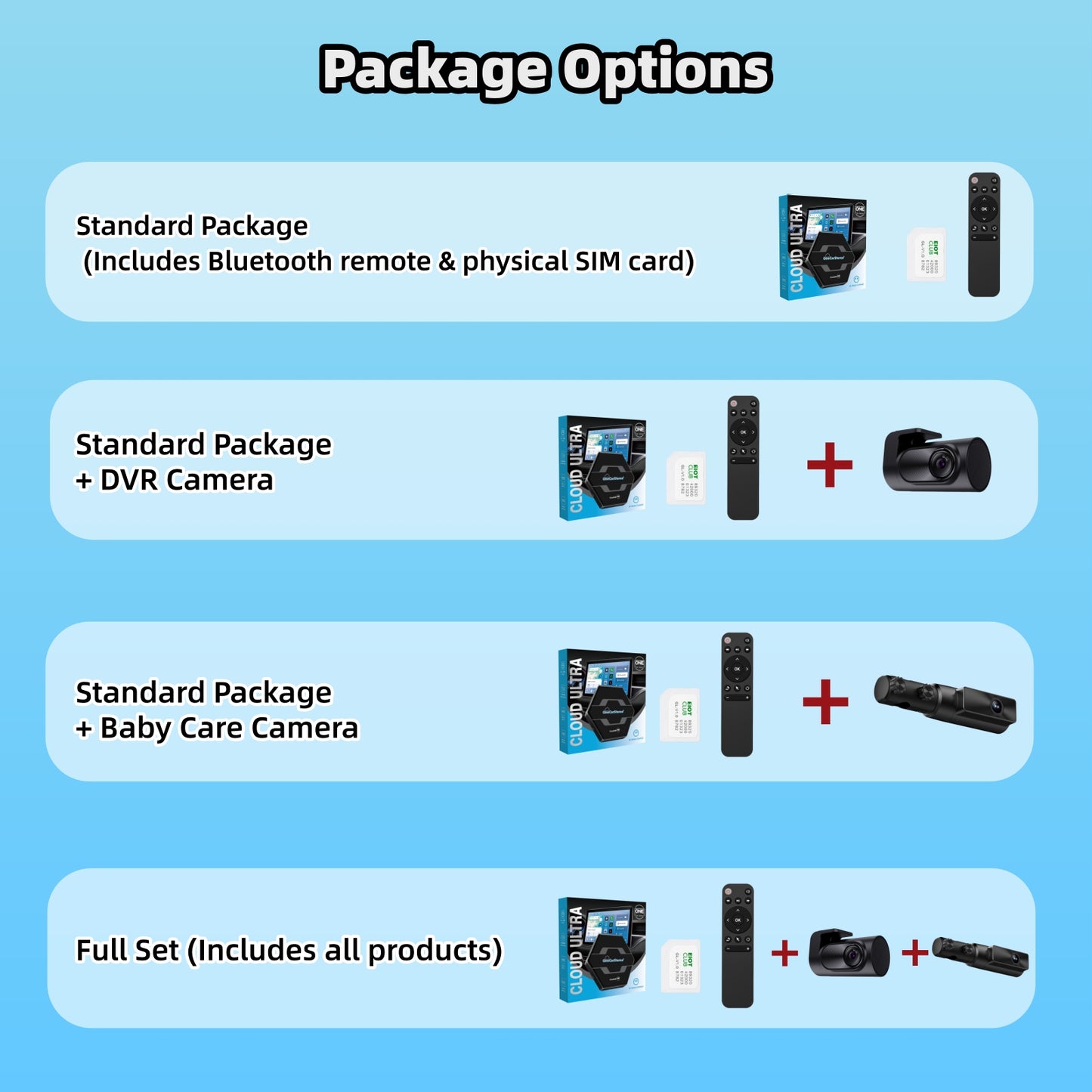
Package

🌍Free Shipping & 4-5 days delivery

✅Certificate with CE, RoHS ,FCC

🚀 In Stock ,ready to ship

Guaranteed Safe Checkout

  • American Express
  • Apple Pay
  • Diners Club
  • Discover
  • Google Pay
  • JCB
  • Mastercard
  • PayPal
  • Visa

⭐What Is New in Cloud AI Box Ultra.

Faster, Smoother, Smarter.
✓ Automotive-grade Qualcomm 6125 Chip
Stable Performance with Smooth Operation.

✓ 8GB RAM + 128GB Storage
Plenty of space for apps, videos, music, and everyday use.

✓ NEW HDMI Input & Output
Connect external devices or output content to larger displays with ease.

✓ NEW Cloud SIM Technology
Get online without relying entirely on your phone's hotspot.

✓ Free SIM Card Included
Ready to connect right out of the box.

✓ NEW AI Voice Assistant
Control navigation, music, and apps with simple voice commands.

✓ Wireless CarPlay & Android Auto
Enjoy a seamless driving experience with your favorite smartphone features.

❗Compatibility Check

Our CarPlay Boxes are compatible only with vehicles that have Wired CarPlay & Android Auto or both Wired and Wireless CarPlay & Android Auto.

❌ Wifi signal and 4G module are not applicable to Japan
❌ Not compatible with vehicles that have Wireless CarPlay Only (e.g. BMW).
❌ Not compatible with vehicles that lack a touchscreen display.
❌ Not compatible with vehicles equipped with an aftermarket CANBUS (Decoder / protocol box) system.
❌ Not compatible with vehicles that have an aftermarket car stereo installed.
❌ Not compatible with Mazda CX-60, Subaru REX.

✅ Except for Pioneer, Sony, and Kenwood double DIN stereos that support Wired CarPlay.

Warranty and After-Sales Support

✅ Rest assured with our 1-year warranty and lifetime after-sales support.

We are committed to providing you with a high-quality and convenient in-car experience. Should you have any questions, please don't hesitate to reach out to our customer support team.

Visualizza dettagli completi

  • Free Shipping Worldwide

  • 365-Day Warranty

  • 45-Day Return

  • 100% Payment Secure

Follow OneCarStereo on YouTube

FAQs

⭐What Is New in Cloud AI Box ULTRA

✓ Powered by Automotive-Grade Qualcomm 6125 Chip
Experience faster, more stable performance built for the road

✓ NEW Cloud SIM Connectivity
Stay connected without relying on your phone’s hotspot.
*Get 10GB of free data with your first-time activation

✓ NEW HDMI Input & Output Support
Easily connect external devices and enjoy more flexible entertainment options.

✓ SIM Card Included
Ready to use right out of the box — no extra setup required.

✓ NEW AI Voice Assistant
Control navigation, music, and apps effortlessly with voice commands.

✓ Wireless CarPlay & Android Auto Compatible
Bring your favorite smartphone features to your vehicle with a seamless wireless experience.

✓ 8GB RAM + 128GB ROM
Run more apps smoothly and store more videos, music, and content.

How to Check Whether Your Vehicle Supports Wired CarPlay or Wired Android Auto?

① Please turn OFF Wi-Fi and Bluetooth on your smartphone first.

② Connect your smartphone to the vehicle’s USB port using a USB data cable.

③ Check whether the vehicle display shows any of the following prompts:

For iPhone users:
If a message such as “Use CarPlay?” appears → Your vehicle supports wired CarPlay.
For Android smartphone users:
If a message such as “Start Android Auto?” appears → Your vehicle supports wired Android Auto.

④ If no message appears after connection, or the smartphone only charges without any other response, your vehicle may not support wired CarPlay or wired Android Auto.

※ Notes:

Please make sure Wi-Fi and Bluetooth are turned OFF before testing.
Vehicles that only support wireless CarPlay cannot be used with this product.
Compatibility may vary depending on the vehicle model, production year, and the specifications of the factory-installed infotainment system.

How can I obtain the electronic user manual for the Cloud AI Box ULTRA?

You can scan the QR code on the manual to view or download the electronic version. You can view it online or download a PDF for offline use. If the QR code doesn’t work, please make sure it is clean and fully visible. If it still doesn’t work, contact us by email at support@onecarstereo.com. The electronic manual is available in multiple languages, and you can switch languages by using the language selector at the top-right corner after scanning the QR code.

video

video

video